 Shortlist
How to get Plex recommendations based on each user's watch history
Plex's library rows are identical for everyone and ignore what you've watched. What Plex really does with watch history, why smart collections aren't personal, how to build Netflix-style rows that are, and what good looks like.
Short answer: Plex records everyone’s watch history, but it doesn’t use it to build the rows on your server. Recommended, Home and every pinned collection are library-wide — identical for every account. Getting rows built from a person’s own viewing means reading that history yourself and creating collections from it.


shortlist_sarah; every other account's sharing filter excludes that label, so Mike never sees Sarah's picks and she never sees his.This page covers what Plex genuinely does, why the advice people are usually given doesn’t get them there, and what reading the history yourself actually involves.
What Plex does with watch history today
Plex tracks watch state per account, and it does use it — just not where you want it.
Continue Watching and Up Next are personal. These are the only genuinely per-user rows on your server, and they only ever contain things you’ve already started. They answer “where was I”, not “what next”.
Discover recommendations are personal, but off-server. If you’ve enabled it, Plex builds suggestions from your account activity and shows them under the Discover source. They’re mostly titles on streaming services, not things in your library, and the setting that controls it lives in your Plex account profile rather than your server.
Library rows are not personal at all. Recommended, Home shelves, genre rows, “Recently Added”, and anything an admin has published — every account with access sees the same rows with the same titles. Plex has no per-account library personalisation, and no setting anywhere turns it on.
That last point is the whole problem. On a server with any number of users, the person who has watched every sci-fi film you own and the person who has watched nothing but comedies are looking at an identical home screen.
The one thing smart collections can’t do
“Make a smart collection” is the advice you’ll get most often, and it is worth doing — a saved filter
like “highly rated thrillers you haven’t seen” gives your shelf real shape for no cost. It just
doesn’t read anyone’s watch history. The filter runs against the library rather than the viewer, so
Unplayed means unplayed by the admin account, and every user sees the same row whatever they
have watched. How to improve Plex recommendations
covers what to build and exactly where it stops.
Everything below is about the thing smart collections can’t reach: a row built from one person’s own viewing.
Read the history and build collections yourself
The data you need does exist and is reachable.
Each account’s watch history lives on the Plex Media Server and can be read per user, which is what every tool in this space is doing under the hood. There are two routes:
- Ask the Plex server directly, using each share’s own access key. When someone accepts a share, that share comes with a key that identifies them, and history read with it is genuinely that person’s. This is the accurate route, and it’s the one Shortlist uses.
- Tautulli. Tautulli has watched your server for as long as it’s been installed and exposes per-user history over its API. Widely used and easy to query. Its identifiers are display names rather than stable account IDs, which matters if anyone on your server has ever renamed themselves or shares a name with someone else.
From there the shape of the job is: take what a person watched, find similar titles that are already in your library, drop anything they’ve seen, and put the result in a collection. Similarity usually comes from TMDB — shared genres, keywords, cast, crew — or from a recommendations service like Trakt, optionally with an AI model ranking the shortlist at the end.
Where it stops: the collection you just built is visible to everyone with access to that library. You’ve made a personal row and published it to the whole server, which is both a privacy problem and a clutter problem — twenty users means twenty rows on everyone’s home screen. Fixing that is a separate mechanism, covered in per-user collections.
What “good” looks like
If you’re evaluating approaches — your own script or someone else’s tool — these are the things that actually distinguish a usable result from a demo:
Picks must exist in your library. Any approach that asks a language model “what should this person watch?” and trusts the answer will produce titles you don’t own, titles that don’t exist, and titles under slightly wrong names. Generate candidates from your library and use the model to rank them, never to invent them.
History has to be per person, not per server. Reading the admin’s history and calling it everyone’s is the most common shortcut, and it produces one recommendation set wearing several names.
Rows need to refresh, and to change when they do. A row rebuilt nightly from an unchanged history should still shuffle its picks, or people stop looking at it after a week.
Say why. “Because you watched Arrival” is the difference between a row people trust and a row that looks arbitrary. It’s also how you debug a bad pick.
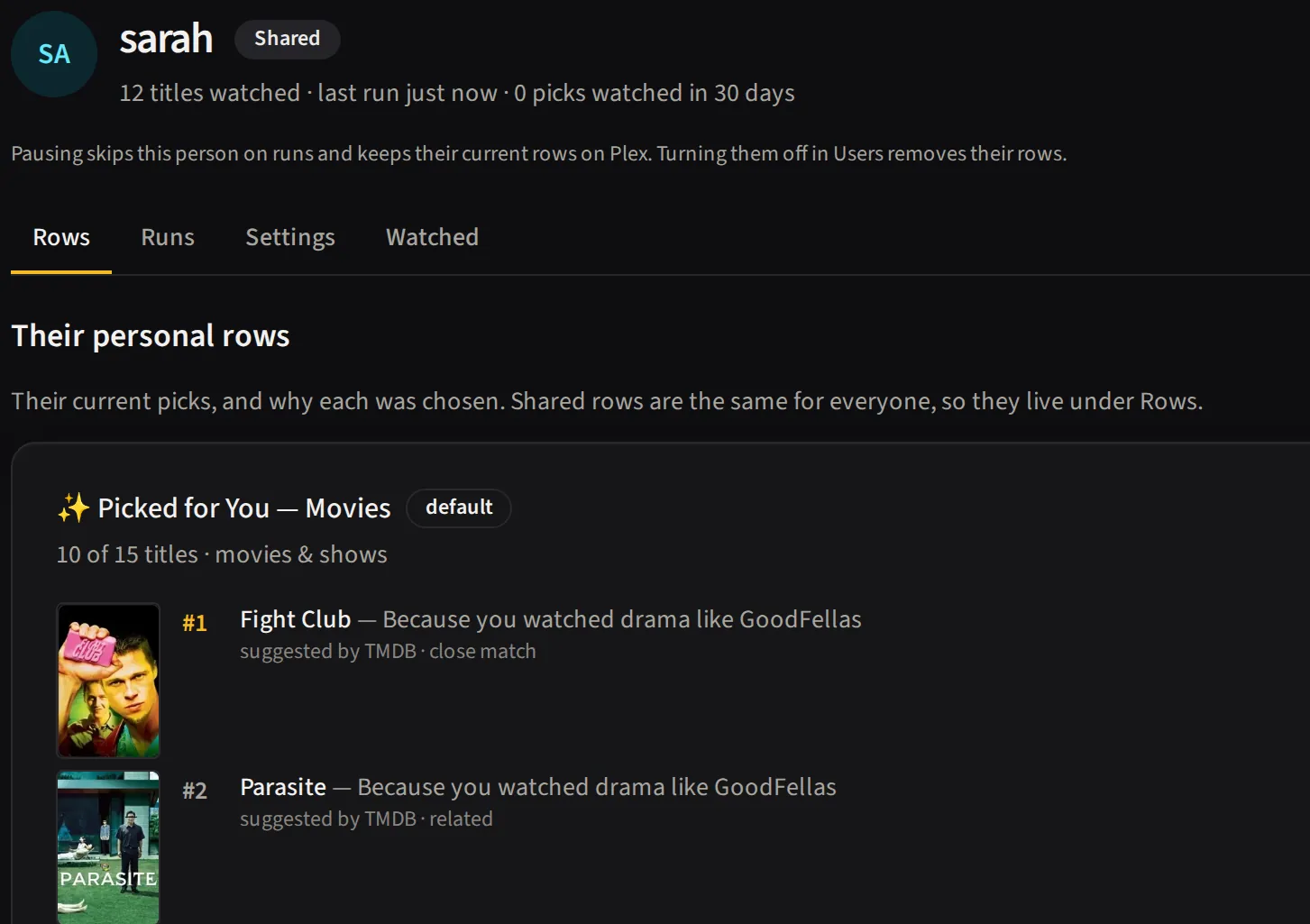
 Fight ClubBecause you watched GoodFellas — more crime and dramaSarah's movies row
 SeveranceBecause you watched The Wire — more drama and crimeSarah's TV row
 The ExpanseBecause you watched Breaking Bad — more drama and crimeMike's TV row
Handle the person who’s watched nothing. New users have no history. Falling back to library-popular or recently-added is fine; producing an empty row is not.
If what you want is “like Netflix”
Ask for Netflix-style rows and you’re usually asking for four separate things: different rows for different people, a stated reason on each row, rows that change, and rows built from things you can actually watch right now. Plex gives you the last one for free, because it’s your library. The rest is the work above, plus two details worth stealing.
Name the row after its reason. A Plex collection has a title and a summary, both of which show in the UI, so a row can be called “Because you watched Arrival” with a summary explaining each pick. Naming rows after their seed is most of the Netflix feel for almost no effort.
Change the row on purpose. Rebuilding on a schedule isn’t enough on its own: the same watch history scored the same way produces the same row every time. You need either fresh input (new watches, new library additions) or deliberate variation: rotate which seed drives the row, sample from a larger candidate pool than the row can hold, or weight recent watches more heavily.
Two limits stay put whatever you build: the server owner sees every row, and films and shows need separate rows. Per-user collections explains why.
Do it automatically
Shortlist does this for every person on your server, every night: it reads each person's own watch history, picks only titles already in your library, says why, and hides each row from everyone else with Plex sharing filters (the server owner and some restriction profiles are the exceptions). It is one self-hosted Docker container, and AI is optional.
docker run -d --name shortlist -p 5959:5959 \
  -e TZ=Etc/UTC -e PUID=1000 -e PGID=1000 \
  -v /path/to/shortlist/config:/config \
  --restart unless-stopped \
ghcr.io/stevezau/shortlist:latestRelated
- How to improve Plex recommendations — the settings to change first
- AI recommendations for Plex — where a model helps, and where it invents films
- Per-user collections — making a row only one person can see
- Plex recommendation tools compared — the other projects in this space
- What goes in a row — tuning sources and seeds in Shortlist