 Shortlist
Rows and templates
Start a row from a template, choose what kind of row it is, and name it. What fills each kind, seasonal rows and where a row sits on Plex each have their own page.
A row is one Plex collection per person (or one shared by everyone, for Popular on this server), rebuilt on its own schedule. This page covers starting one and the choices every row makes. The rest of the rows guide is split by question:
- How a row is filled: Because you watched and Watch it again rows, people with too little history, and the order titles appear in.
- Seasonal rows: rows that follow holidays, film days and your own dates.
- Where a row shows: Home and the Recommended shelf, placement next to other collections, posters, descriptions and sort titles.
- Your requests rows and per-row request settings are in the Requests guide.
Starting from a template
There are eleven starting templates: Picked for You, Because you watched…, Watch it again, Your requests, Fresh finds, Seasonal, From the vault, Popular on this server, Movie night, More TV to watch and Describe a row (an AI row, which needs an AI provider). Rows → Add a row opens a page where you pick a kind of row, choose a starting template if the kind has more than one, name the row and choose who gets it, with a preview of what it will look like on Plex. Press Add row to create it (a Describe a row template says Continue and takes you to its editor to write the list first). Every field remains editable afterwards, and Set every option yourself opens the full editor instead. Your requests is for titles someone requested that are now ready on Plex.
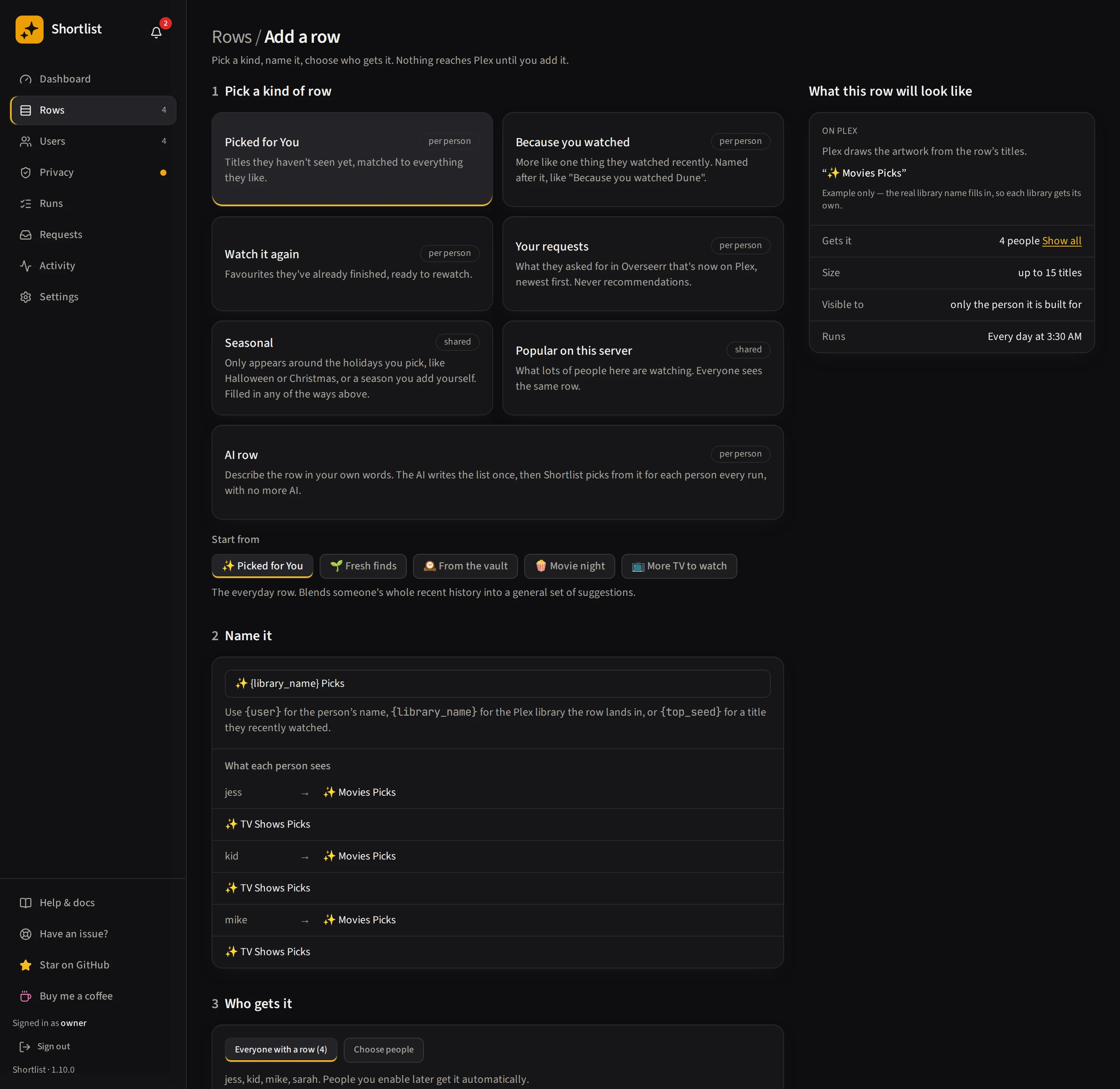
In the editor, Per person / Shared stays visible above Row type, whichever template you start from. The template selects a starting choice; you can change it before saving.
Every template starts with Everyone as its audience: everyone with Shortlist enabled. The preview shows Row (Shared or Per person) separately from Audience, because sharing the same picks and choosing who receives them are different choices.
- Shared: Seasonal and Popular on this server. Seasonal starts with 15 films watched by at least two people; Popular starts with 20 titles watched by at least three.
- Per person: Picked for You, Because you watched, Watch it again, Your requests, Fresh finds, From the vault, Movie night and More TV to watch. Their picks depend on each person’s viewing or requests. Movie night is a personal shortlist of ten films for an evening.
Fresh finds and Movie night do not wait for a new watch before their nightly and weekly refresh cadence can apply. From the vault excludes watched titles even if the global setting allows some. Because you watched uses one recent watch for recommendations and web-search seeds. Source selection and request limits follow your configured server settings. These starting defaults apply to new template rows; saved rows keep their settings.
Editing a row
The editor shows One row each, or one for everyone? with Per person and Shared choices, then labels its current Row type. Per person gives each person their own picks; Shared gives everyone in the selected audience the same server-popular titles. The row types offered follow that choice, and Seasonal is available in both.
The row editor is one page. A jump list on the side goes to each section, which uses the same name as its heading: Name & look, Who gets it, What goes in, Schedule, Placement, Requests and Danger zone. The Live on Plex strip at the top holds the changes that apply to Plex immediately: the row’s on/off switch, Rename on Plex and Run now. Everything else stays a draft until you save: the sticky save bar at the bottom lists what is about to change and has Save changes and Discard. Artwork operations keep their own actions. Removing or deleting a row is in the Danger zone, with a confirmation.
Rated by · global setting saves immediately and affects every row and Requests; its saving, success or error message appears beside that control.
Under Who gets it, Everyone reaches everyone with Shortlist enabled; Choose people lets you select individual recipients. The people lists show ten per page by default. Use Search people to find someone, or Show to display 10, 25, 50 or All people. The result count and Previous/Next controls show where you are in the list.
Searching and paging only change the list you see, not who gets the row. Selections stay selected across searches and pages and apply when you save the row. The audience table keeps the library and account-hiding information for each recipient.
Row kinds
There are six row kinds. In the editor, choose Per person or Shared, then Change row type. Each kind fills the row in a different way, and picking one changes which settings appear below it, so you’re never hunting for a setting that doesn’t apply to what your row does:
- Picked for You — Titles they haven’t seen yet, matched to everything they like.
- Because you watched — More like one thing they watched recently. Named after it, like “Because you watched Dune”.
- Watch it again — Favourites they’ve already finished, ready to rewatch.
- Your requests — What they asked for in Overseerr, once it’s on Plex. Each title leaves once they’ve watched it. See Your requests rows.
- Seasonal — Only appears around the holidays you pick, like Halloween or Christmas. Filled in any of the ways above, except Your requests.
- Popular on this server — What lots of people here are watching. Everyone sees the same row.
Seasonal isn’t another way of filling a row — it’s a schedule wrapped around one of four of the others. Pick it, choose which seasons the row follows, then choose how it’s filled: Picked for You, Because you watched, Watch it again, or Popular on this server. The settings for whichever fill you pick then show underneath, exactly as they would if the row weren’t seasonal at all — so every combination (a seasonal “Because you watched” row, a seasonal shared row, and so on) stays reachable. In the editor, Per person offers the three personal fills under What goes in → How it’s filled. Choose Shared above Row type to fill a seasonal row with Popular on this server instead. Switching between these choices keeps the seasons and their timing. A Your requests row is the one kind that can’t be seasonal: a request lands when it lands, so no season decides whether the row shows. See Seasonal rows.
The default row can’t be Seasonal — its name is the one every person’s everyday row uses — so the
picker shows Seasonal disabled there, with an explanation. Every other kind is still available on the
default row, unless its name (which lives in Settings → Defaults → Row defaults) uses {top_seed}: that
name makes it a Because you watched row whatever else you pick, so the other kinds are disabled, with
a link to where the name is changed.
You can switch a row’s kind at any time. On a row you’ve already saved, switching opens a dialog first: “Change this row to X?”, then a plain sentence for each thing that will change — settings that appear, settings that disappear, and anything the new kind forces (a row whose name follows a watch, for example, picks new titles every night). Nothing is applied until you confirm. On a new, unsaved row the switch just applies, since there’s nothing on Plex yet to warn you about. The Per person / Shared choice uses this same confirmation. Cancelling leaves the draft unchanged; confirming updates the draft, and saving applies it.
Switching is always worked out from the row as you opened it (or, for a new row, as its template filled it in), plus anything you’ve changed by hand in a setting that kind has — never from the kind you switched to a moment ago. So switching back gives you the row exactly as it was, and a setting you only changed after switching (say, Take turns on a Picked for You row you’d made Because you watched) goes back with it; the dialog lists it. The one exception is Seasonal: picking it makes the row you’re looking at seasonal, filled the same way, and changing only how it’s filled keeps the seasons you’ve narrowed.
When a switch needs a new name, saving stores it with the switch. Where it shows up on Plex depends
on the row: the rename screen renames it straight away; a name that uses {top_seed} (before or
after) appears the next time the row runs; a switch to or from Popular on this server uses it when
the row is rebuilt; and a switched-off row takes it when you turn it back on and it runs. Until you
save, the new name sits in the Name box, where you can still change it.
That dialog also says what happens on Plex once you save, because it isn’t the same for every switch:
- Switching between a per-person kind and Popular on this server changes what’s on Plex immediately, not on the row’s next run. Switching a per-person row (Picked for You, Because you watched, Watch it again) to Popular on this server removes everyone’s own copy of the row from Plex right away; one shared row, the same for everyone who gets it, is built the next time the row runs — if enough people have watched titles in common. Switching a shared row back to a per-person kind removes the shared row from Plex right away, and each person gets their own private row the next time the row runs. Either way, until that next run, nobody has the row. This is all that saving does on Plex, even when the same switch also turns Seasonal on or off.
- Switching to Seasonal applies the season dates on Plex straight away. If today is outside them, the row is hidden as soon as you save.
- Switching away from Seasonal: if the row is hidden between seasons right now, saving puts it back on Plex straight away, still holding the titles from its last season.
- Every other switch doesn’t touch Plex until you save and the row next runs.
- A switched-off row isn’t on Plex, so no switch changes anything there; its settings apply when you turn it back on. If Pause all users is on in Settings, under System → Run speed, anything that waits on a run waits until you resume, and the dialog says so.
A switch to a per-person kind can still be refused when you save, if another per-person row already uses the same name in a shared library — the editor shows that the same way it does today.
Naming a row
A row’s name can be plain text (“Hidden Gems”) or use a placeholder that fills in per person when the row is built:
{library_name}— the library the row is built in.✨ {library_name} Picked for Youbecomes “✨ Movies Picked for You” in your Movies library and “✨ TV Shows Picked for You” in your TV library. This is the default row name, so a server with several libraries gets distinct titles instead of two identical “Picked for You” rows.{user}— the person’s name.{user}'s picksbecomes “Sarah’s picks”. That name is their nickname if you’ve set one (Users → open someone → “What to call them”), otherwise whatever Tautulli calls them, otherwise their Plex username. Which is often a handle nobody uses. Changing a nickname renames their existing rows on Plex; it never changes their label, so their privacy is unaffected.{top_seed}— the title that most drove their recommendations.Because you watched {top_seed}becomes “Because you watched The Bear”.{season}and{season_emoji}— on a seasonal row only, the season it’s in and its emoji.{season_emoji} {season} picksbecomes “🎃 Halloween picks” in October and “🎄 Christmas picks” in December. A row that follows no season can’t use them, and Shortlist refuses the save.
Two rows can have the same name as long as they never build in the same library — a movies-only row and a TV-only row can both be called “Picked for You”. Two rows that could land in one library can’t share a name, because Plex would hold them as a single collection there; Shortlist refuses the save and tells you which row already has it. Rows set to “every library of this type” count as reaching libraries you add later, so pick specific libraries if you want to reuse a name.
The seed is the strongest pick that came from something they watched. Some sources suggest a title without following one — what’s trending, what’s popular on your server, a web-search find — so those contribute picks but no seed. The name uses the strongest pick that has one. If none has one — say their newest film has no look-alikes in your library, so the row was filled from discover and web search — the name uses the watch the row was built from.
In a row covering Movies and TV, each library is named after its own watch: the Movies row after a film, the TV row after a show. A library borrows the other’s name only when the row has no watch of its type to follow.
With two libraries of the same type, such as TV Shows and Anime, each is named after a watch it holds: the TV Shows row after a show in TV Shows, the Anime row after one in Anime. See A row in more than one library.
If a {top_seed} row is built for someone with too little history to have a favourite at all, it
falls back to a clean default (“✨ Picked for You”) rather than a half-finished sentence — or you can
have the row not appear for them; see
People without enough watch history. You can rename any
row at any time in the Row editor, and the collection on Plex is renamed in place, so its place
in the shelf and its privacy are preserved.
A {top_seed} row needs the right “Based on” setting to be honest. By default every row is
built from a person’s 30 most recent watches blended together, so a row titled “Because you watched
The Bear” would really be “because you watched these thirty things, one of which was The Bear” unless
you narrow it down. Row editor → Because you watched → Which watch it’s based on → Based on is
where that lives — see Because you watched rows for the options and
what each one means for the name.
There is a server-wide default for how many recent watches every discovery source searches from, in Settings → Defaults → Refresh & variety → How many recent watches to match, and a row can override it in the row’s own kind settings (for a Picked for You row that’s under How picks are chosen; for Watch it again, under When their finished titles run out). The global stops at 5 while a row can go down to 1, because narrowing to one watch is a choice worth making for a single row rather than imposing on every row at once. Watches the AI web search looks up is a slice off the front of that same list, and caps the AI web-search source alone. How much of their history it searches from adds long-time favourites and older watches to those recent ones (presets: Recent only, A little older, Balanced, Deep, or Custom). It defaults to Recent only, and a row, or one person on a row, can set their own.
Edit this page on GitHub