 Shortlist
How to make a Plex collection visible to only one user
Plex has no per-user collections or per-user home screen rows, but label restrictions on share filters get you there. What managed users, pinned sources and published collections change, the manual steps, the ordering mistake that leaks, and what it costs at your server's size.
Short answer: Plex has no per-user collections, but it does have label restrictions. Give the collection a label, then tell every other account to exclude that label. What’s left is a collection hidden from other supported accounts. The server owner and some restriction profiles are exceptions.
It works, it’s supported, and it needs Plex Media Server 1.43.2.10687 or newer plus a Plex Pass on the admin account. The rest of this page is how to do it, and the one mistake that quietly leaks the collection to everyone.
Why there’s no direct setting
Plex collections belong to a library, not to a user. Everyone with access to that library sees every collection in it. There is no “share this collection with Alice only” checkbox, and there never has been.
What Plex does have is a per-share content filter. When you share a library, you can restrict what that person sees by rating, by genre. And by label. That last one is the lever, because labels are something you control and Plex evaluates them per account.
So the trick isn’t making a collection visible to one person. It’s making it invisible to everyone else.
What each account can already change for itself
Some of the home screen is per-account, which is why this question gets confusing answers.
Pinned sources and their order. Each user chooses which servers and libraries appear in their sidebar and can reorder them. This is stored per account, so two people genuinely can have different home screens in that sense — but they’re picking from the same set of rows.
Continue Watching and Up Next. Genuinely personal, and the only rows on the server whose contents differ per viewer.
Hiding a row locally. In some clients a user can dismiss individual shelves. Client-side, inconsistent between apps, and it doesn’t survive much.
What none of that does is give someone a row of different titles chosen for them.
What the admin controls, and why it doesn’t help
Manage Recommendations (library → Manage Recommendations) lets the admin choose which rows appear on the Recommended shelf and in what order. It’s a server-wide setting. Change it and you’ve changed it for everybody.
Publishing Collections lets the admin promote a collection to Home or Recommended for shared users. This is the closest thing Plex has to “put a curated row on people’s home screens”, and it’s worth knowing about — but a published collection goes to everyone who can see that library. There is no per-account targeting in the publishing UI.
Managed users (Settings → Users & Sharing → add a managed user) create separate profiles under your account with their own watch state and their own content restrictions. People reach for these expecting Netflix profiles. They do give separate watch history, which is real and useful. They do not give separate recommendation rows — a managed user still sees the library’s shelves.
So: the admin can decide what rows exist, and each user can decide which libraries they look at. Nobody can make a row that contains different titles for different people. Not through the UI.
Why this only started working in 2026
Label restrictions have existed for years, but they weren’t applied everywhere. A collection hidden by label would still surface on the Home shelf, the Recommended tab, or in “Related” rows, so a “private” collection wasn’t private at all. This is why the technique didn’t reliably work before, and why older forum threads say it can’t be done.
Plex closed those holes in 2026:
| Plex Media Server | What it fixed |
|---|---|
| 1.43.1 | Label hiding applied to the Home and Recommended shelves |
| 1.43.2.10687 | Label hiding applied to Related rows |
Below 1.43.2.10687 the exclusion is ignored in at least one surface, and the collection leaks. Check Settings → General on your server before relying on any of this.
The manual method
For a single collection shared with a single person:
- Label the collection. In Plex Web, open the collection → Edit → Tags → add a label,
e.g.
picks_alice. Use a prefix you’d never use for anything else, so you can always tell your labels apart from ones Kometa or another tool manages. - Exclude that label from everyone else. Go to Settings → Users & Sharing, and for every
other account with access to that library: edit their library access, find the per-library
restrictions, and add
picks_aliceto Exclude Labels. (The exact wording shifts between Plex versions; you’re looking for the label-exclusion field under the shared library’s restrictions.) - Leave Alice’s own share untouched. She’s the one person who should not have the exclusion.
That’s it. Alice sees the collection; nobody else does.
Two things to watch out for
The server owner can’t be restricted. Plex doesn’t apply share filters to the admin account, because there’s no share to filter. If you’re the owner, you will see every labelled collection on the server no matter what you do. That’s a Plex limitation, not something to debug — so check your work from a non-owner test account, because the admin session will always show you everything.
Movies and TV need separate rows. A collection lives in one library, and Plex keeps the label restrictions for a movie library and a TV library as two separate settings. If you want someone to have a private row of films and one of shows, that’s two collections with the same label. A collection holding the wrong type for its library matches neither setting, which makes it impossible to hide from anyone.
Do it in the wrong order and it leaks
This is the part people get wrong, and it’s worth being blunt about it.
The obvious order is: create the collection, then add the exclusions. Don’t. Between those two steps the collection exists, is unlabelled or unexcluded, and is visible on the Home shelf of every single person you share with. On a server with 40 users that’s a window where 39 people can see a row built from someone else’s viewing habits. Plex clients also cache shelves aggressively, so “I fixed it a minute later” doesn’t necessarily un-show it.
The safe order is:
- Create the collection unpromoted. Not on any shelf yet.
- Label it.
- Merge the
label!=exclusion into every other account’s share filter. - Only then promote it to Home / Recommended.
Keep the gap between steps 1 and 3 short. An unpromoted collection is off every shelf, but it is still listed in the library’s Collections tab for any account whose filter does not exclude it yet. Do it in this order every time, even when you’re “just testing”.
Merge the filter, never rebuild it
When you edit a share filter, read what’s already there and add to it. Plex stores these as a single string per library, like:
contentRating!=R,label!=picks_bob,label!=picks_carol
If you overwrite that string with just your own exclusion, you have silently removed someone’s
parental-control restriction or another tool’s rules. Read what’s there, add your label alongside the
label!= entries already in it, and leave every other condition exactly as it was.
Snapshot the original values before your first change. It’s the only way to put a server back the way you found it.
Why this doesn’t scale by hand
The mechanism is sound. The arithmetic isn’t. Every private collection needs an exclusion on every other account, so the work grows with the square of your user count — twenty users with a row each is 380 filter entries, every one of them a string you must edit without corrupting. Add a user, or a second row, and you touch them all again.
What it costs at your server’s size
Each private row needs an exclusion on every other account. For n users with one row each, that’s n × (n−1) share-filter entries:
| Users | Filter entries to maintain |
|---|---|
| 3 | 6 |
| 10 | 90 |
| 20 | 380 |
| 40 | 1,560 |
And it isn’t a one-time cost. Add a user and you touch every existing share. Add a second row type — films and shows are separate collections, because label restrictions are evaluated per library — and it doubles. Rebuild rows nightly and every run walks the whole matrix again, reading each account’s current setting, changing only its own part, and writing it back without breaking the rest.
Two or three collections by hand is fine. Past that you want something maintaining the matrix for you.
Do it automatically
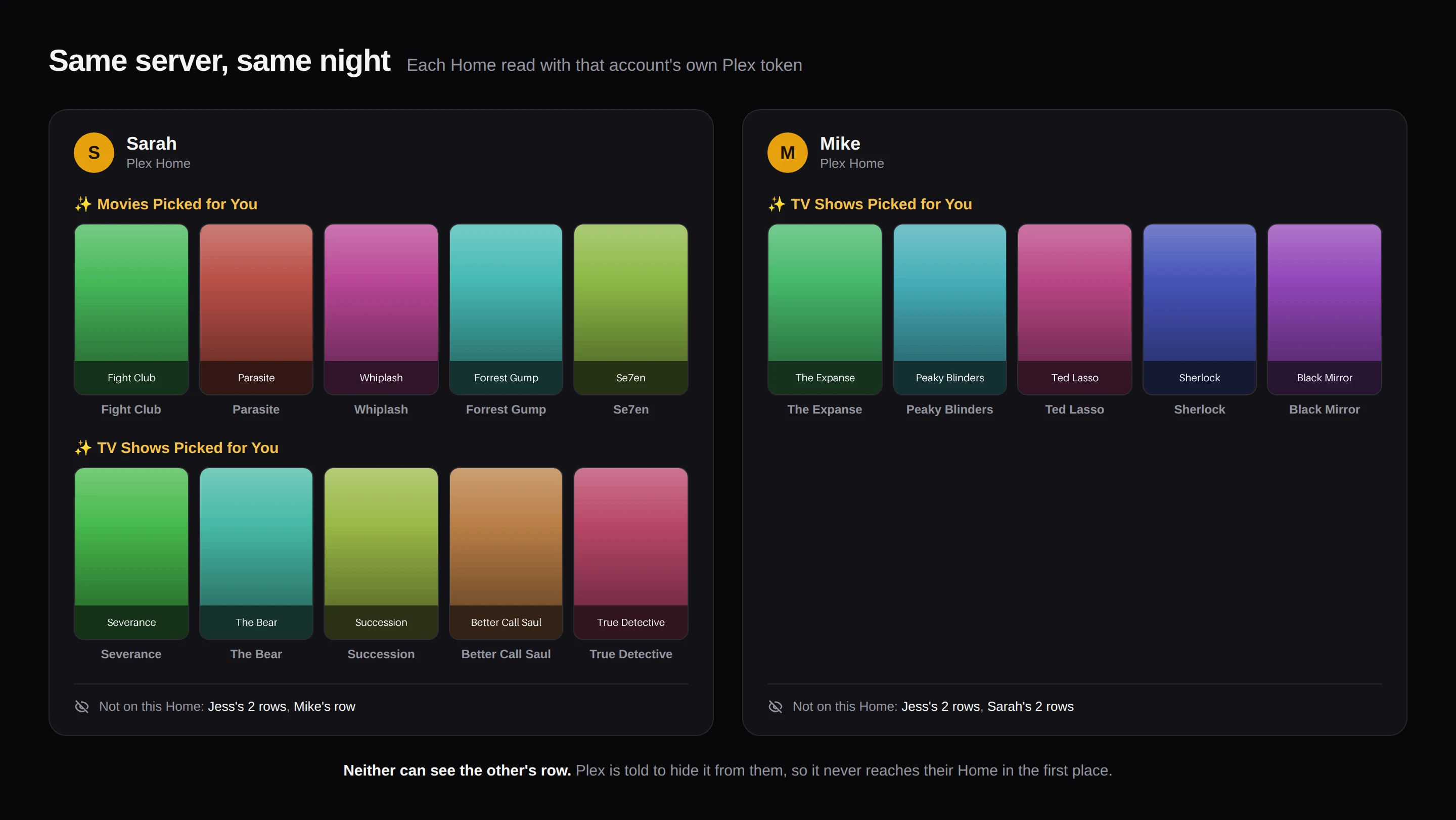
Shortlist does this for every person on your server, every night: it reads each person's own watch history, picks only titles already in your library, says why, and hides each row from everyone else with Plex sharing filters (the server owner and some restriction profiles are the exceptions). It is one self-hosted Docker container, and AI is optional.
docker run -d --name shortlist -p 5959:5959 \
  -e TZ=Etc/UTC -e PUID=1000 -e PGID=1000 \
  -v /path/to/shortlist/config:/config \
  --restart unless-stopped \
ghcr.io/stevezau/shortlist:latestRelated
- How to improve Plex recommendations — the settings to change first
- Recommendations from watch history — where the titles in the row come from
- Plex recommendation tools compared — which project fits which server
- FAQ — How is this private?
- Getting started — install and the setup wizard
- Reference — settings, the API, and how Shortlist decides things